【已修复】为什么第一段没有缩进?
✅ Typst 0.13 已修复
#5768 增加了 all 选项,可以缩进所有段落了。
typst
#set par(first-line-indent: (amount: 2em, all: true))

= 标题

首段也缩进了。

之后段落原本已缩进。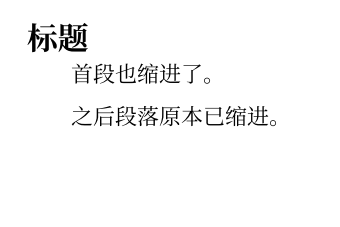
不过,公式、图表等块元素后也强行缩进了,可另外修复。
首先,英文排版是这样的,LaTeX 默认第一段也是不缩进的。其次,这部分实现有一些 bug,当前还不能通过修改设置来实现缩进。要修复这个问题,可以使用下面的方法:
方法 1:假段落(推荐)
typst
#set par(first-line-indent: 2em)
#let fakepar=context{let b=par(box());b;v(-measure(b+b).height)}
#show math.equation.where(block: true): it=>it+fakepar // 公式后缩进
#show heading: it=>it+fakepar // 标题后缩进
#show figure: it=>it+fakepar // 图表后缩进
#show enum.item: it=>it+fakepar
#show list.item: it=>it+fakepar // 列表后缩进
// #show xxx: it=>it+fakepar // 其他需要修复缩进的元素
#let noindent()=h(-2em)

= 标题
缩进修复了

$ E=m c^2 $
#noindent() 其中,$c$ 表示光速。 // 缺点是这里要手动 #noindent()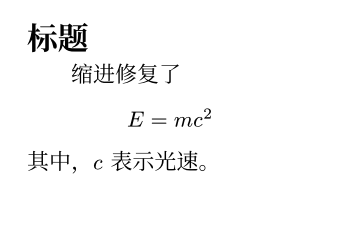
优点:简单优雅
缺点:图表和公式后面的段落也会默认缩进。当你需要写“其中,XXX”的时候,要手动取消缩进。
方法 2:使用 indenta 包
WARNING
indenta 0.0.3 已不适用 Typst 0.13
typst
#set par(first-line-indent: 2em)
#import "@preview/indenta:0.0.3": fix-indent
#show: fix-indent()

= 标题

缩进修复了

$ E=m c^2 $
其中,$c$ 表示光速。
优点:方便自由控制图表和公式后面的段落是否缩进
缺点:可能存在一些缩进失效的情况
方法 3:一次性手动缩进
若仅需一次性使用,可用 #h(2em) 手动空两个字。
typst
#set par(first-line-indent: 2em)

#let indent = h(2em)

= 一级标题

#indent 豫章故郡

台隍枕夷夏之交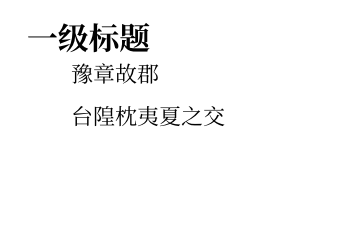
 Y.D.X.
 QuadnucYard
 flaribbit